



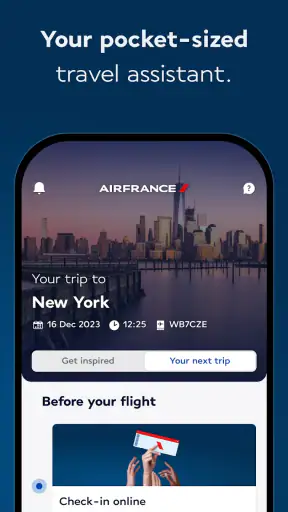
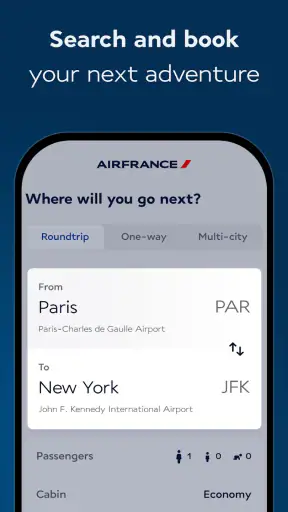


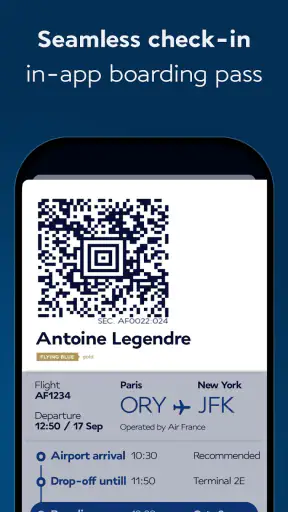
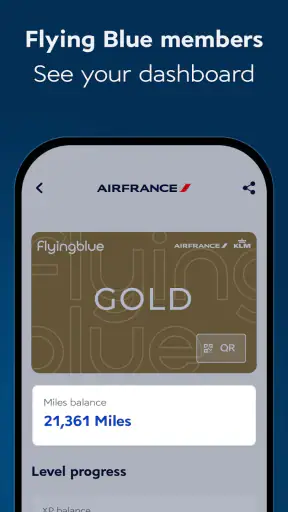

Air France - Book a flight is the kind of travel app that makes the most sense when a trip is already becoming real. I used it as a companion rather than treating it as a simple booking shortcut, and that distinction matters. Its job is to keep the important parts of an Air France journey close at hand, from the first search to the moments when plans become more time-sensitive. I found the experience most useful when I wanted one place for airline-specific tasks instead of moving between a browser, email confirmations, and general travel tools.
As a free Travel & Local app from AIRFRANCE S.A., it is aimed at travelers who regularly fly with the airline or who want to manage a particular booking through an official mobile channel. It is available to everyone by age rating, and its large audience—more than five million installs and an average rating of 4.4 from roughly 165 thousand ratings—suggests that it has become a familiar part of many passengers’ travel routines. That popularity does not automatically make it perfect, but it does make the app worth examining as a practical tool rather than a novelty.
What feels useful during the first week
My first impression was that the app is more valuable after I have a flight to think about. Searching for a trip is naturally the most obvious starting point, but the stronger reason to keep it installed is the continuity around that trip. An airline app can reduce the small amount of mental effort involved in remembering where a confirmation is, which screen contains the relevant reservation, or where to return when travel day arrives.
That makes it a good fit for a traveler who prefers an official source for airline information. Instead of relying entirely on a search engine or a third-party booking service, I can use Air France’s own app for the part of the journey that belongs directly to the carrier. I particularly like that distinction when a booking changes from something I am comparing into something I need to manage carefully.
One practical workflow is to use a browser or comparison service while deciding which trip to take, then move into the Air France app once I am ready to deal with the airline itself. That avoids expecting one tool to do every job equally well. General travel apps are often better for comparing multiple airlines, while this app is more focused on the Air France side of the journey. The useful boundary is simple: compare broadly elsewhere, then manage the Air France booking here.
I also found the mobile format more comfortable for quick checks than opening a full airline website on a small screen. When I am leaving home, waiting for transport, or standing in an airport queue, I want a direct route to the information connected with my flight. The app’s value comes from shortening those moments, not from turning travel planning into entertainment.
For a realistic everyday scenario, imagine a traveler who booked a weekend away several weeks ago. The confirmation email is buried under work messages, and the departure is close enough that checking the itinerary suddenly matters. Opening the app is more convenient than searching through an inbox, especially if the traveler expects to return to the same booking more than once. That repeated access is where the first-week appeal begins to turn into a habit.
Who benefits most from the focused approach
I would recommend it first to people who fly Air France often enough to recognize the benefit of an airline-specific home base. It also suits travelers who dislike carrying printed documents, prefer handling trip details from a phone, or want to keep their airline interactions separate from hotel and sightseeing apps. The free price removes an obvious barrier, so trying it before a trip is easy.
It is less compelling for someone who almost never flies with Air France. If every journey uses a different airline, a broader travel organizer may offer a more consistent overview across carriers. Likewise, travelers who only want to compare fares may find a general flight search tool more efficient at the beginning of the process. The Air France app becomes more useful when there is an actual Air France journey to follow.
Its minimum operating-system requirement is Android 8.0, which keeps it accessible to many older devices while still making the phone’s age relevant for a small group of users. I would check compatibility before relying on it for an imminent departure, particularly if the device has not been updated in a long time. The current version is 16.11.0, so keeping the app updated is sensible for a travel tool that I may need at an inconvenient hour.
Small habits that make the app more dependable
I would not wait until the airport to install it, sign in, or look for a reservation. The better routine is to open it while I still have stable internet, confirm that the trip appears as expected, and then revisit it before leaving for the airport. This is not glamorous advice, but it prevents the app from becoming one more unknown variable during a stressful morning.
A second useful habit is to treat the app as a companion to, not a replacement for, basic travel preparation. I still keep the booking email available and make sure I know the flight details independently. A phone can lose power, connectivity can be inconsistent, and an app can require an update at an inconvenient time. The official app is a helpful central point, but sensible redundancy remains worthwhile.
I also prefer using it for airline-specific actions while keeping wider trip planning somewhere else. A calendar can hold departure reminders, a notes app can store addresses, and a general travel planner can organize hotels or activities. Trying to force all of those jobs into an airline application usually creates clutter. Air France - Book a flight works better when I let it own the flight-related part of my routine.
Why it can earn a place month after month
The lasting value of this app depends on how often I travel with Air France. For a frequent passenger, the benefit is not one dramatic feature but the repeated reduction of friction. Each trip gives me another reason to return, and the interface becomes familiar instead of requiring me to relearn a website or hunt through messages. That familiarity is especially useful when I am tired, rushing, or dealing with a change of plan.
For an occasional traveler, the pattern is different. I may not open the app between trips, and that is perfectly reasonable. Its recurring value does not come from daily engagement; it comes from being ready when a flight is booked. In that sense, the app is more like a digital travel document holder than a service I should check constantly. The best maintenance is light: keep it installed if I expect to fly Air France again, update it when needed, and open it before important travel moments.
I appreciate that this kind of app can replace several small searches. Instead of looking up the airline separately every time I need to revisit a booking, I have a dedicated place to start. That may sound minor, but travel is full of minor tasks, and removing even a few of them can make a journey feel more manageable. The effect is cumulative rather than spectacular.
There is also a trust advantage in using the airline’s own application for airline-related information. I am less likely to confuse an unofficial itinerary page with the carrier’s own travel flow. That does not mean I stop checking details carefully, but it gives me a clearer point of reference. For passengers who value an official channel, this is a meaningful reason to keep the app around after the initial download.
At the same time, I would not call it a universal travel command center. Its recurring value is tied to Air France, so it cannot replace a cross-airline organizer for people with complicated trips involving several carriers. A frequent traveler with a mixed itinerary may still need a separate tool for the complete journey. The app earns lasting space when its focus matches the user’s flying habits, not when it is judged as a replacement for every travel application.
Where the monthly routine can save time
One of my preferred workflows is to check the app at three points: shortly after booking, a few days before departure, and again on the travel day. The first check confirms that I am looking at the right trip. The second gives me a chance to notice whether anything requires attention. The final check is for convenience when I am already moving through the airport. This rhythm avoids constant checking while still giving the app a useful role.
For travelers who book several flights, separating trips carefully becomes important. I would take a moment to verify the route and date each time I open a reservation, rather than assuming the first visible itinerary is the one I need. That simple pause is a good defense against the common travel mistake of acting on the wrong booking, especially when multiple journeys are close together.
Another advantage appears when plans are discussed with family or colleagues. Having the airline app ready can make it easier to return to the relevant reservation instead of searching through a long message thread. I would still communicate the essential details in writing when coordinating with someone else, but the app gives me a practical reference point during those conversations.
The maintenance burden is low, but not zero
Airline apps have an unusual maintenance profile. I do not need to spend time customizing them every week, yet I do need them to be dependable during a narrow and important window. That means updates matter more than they would for a casual app. I would keep automatic updates enabled when possible, or at least check for an update before a trip rather than discovering one while trying to use the app at the airport.
The app’s current version, 16.11.0, is a reminder that it is an actively maintained product rather than a one-time booking page. I see that as positive, but updates can also introduce a small amount of uncertainty. A screen may move, a sign-in session may expire, or a familiar route may look different. My solution is to open the app before travel day and give myself time to adjust, rather than treating the first airport use as a test.
Account and booking access are also part of the maintenance burden. I want to know which credentials or booking details I normally use before I am in a hurry. If I change phones, clear app data, or have not opened the app for a long time, I would verify access in advance. This is a general precaution, but it matters more here because the app’s usefulness is concentrated around time-sensitive travel.
I would also avoid assuming that the app alone covers every contingency. Keeping a charged phone, retaining the original confirmation, and knowing how to reach airline support through an appropriate official channel are sensible backups. None of this makes the app weak; it reflects the fact that mobile software is one part of a journey involving devices, networks, airports, and human schedules.
The age rating of Everyone makes the app broadly approachable, but that does not remove the need for an adult to supervise complex bookings or family travel decisions. The app can help organize the airline side of a trip, while the responsibility for checking names, dates, documents, and other personal requirements remains with the traveler. I would never treat a convenient interface as permission to skip those checks.
What creates fatigue over time
The main source of fatigue is the app’s narrow usefulness between journeys. If I am not booking or managing an Air France flight, there may be little reason to open it. That is not a flaw in the same way that a missing feature would be; it is the natural consequence of a focused airline app. Still, users who want one app to inspire travel, organize a full itinerary, and track every reservation may find the experience limited.
Another possible frustration is having to move between tools. I may compare routes somewhere else, arrange accommodation in another service, and use this app for the airline portion. That division can be efficient when each tool does its own job well, but it can also feel fragmented. I would choose this app with the expectation that it complements, rather than replaces, the rest of my travel setup.
There is also a psychological fatigue that comes from checking travel information too often. An airline app makes it easy to revisit a trip, but constant checking rarely improves the journey. I get more value by using it at deliberate points instead of turning it into a source of repeated reassurance. The app supports a good travel habit when it reduces searching; it becomes tiring when it encourages unnecessary monitoring.
Compared with a mobile browser, the dedicated app can feel quicker and more focused once I already know I want Air France. The browser remains more flexible for comparing different airlines, searching from unfamiliar devices, or avoiding another installation. Compared with a general travel organizer, this app offers a more direct airline relationship but a narrower view of the whole trip. Those are genuine trade-offs, and neither option is best for everyone.
I would skip it if my travel pattern is almost entirely built around other carriers, if I strongly prefer managing everything in one cross-provider itinerary, or if I do not want airline-specific applications on my phone. I would choose it when the opposite is true: I have an Air France booking, I value an official mobile route, and I want less dependence on scattered confirmation messages.
Does it deserve lasting space?
After the novelty fades, Air France - Book a flight remains useful for a specific reason: it gives Air France passengers a repeatable place to handle the airline side of travel. I do not see it as an app I would browse for fun or keep open every day. Its strength is quieter. It can become part of a reliable pre-flight routine, especially for people who fly the airline more than once or who want a dedicated mobile companion for a confirmed trip.
The app is free, broadly accessible, and supported by AIRFRANCE S.A. Its long presence—the release dates back to January 23, 2014—also helps explain why it feels like an established travel utility rather than a temporary experiment. The strong average rating and substantial install base are encouraging signs, although my recommendation still depends on whether the airline fits the way you travel.
My honest advice is to install it before booking or soon after, explore the relevant journey while you have time, and keep a backup of essential travel information. Use it alongside a comparison tool when shopping around, and alongside a broader organizer when your itinerary includes several providers. That combination gives each app a clear responsibility and avoids expecting Air France’s application to solve problems outside its scope.
For a regular Air France passenger, I think it earns permanent space on the phone because the recurring convenience outweighs the small maintenance effort. For an infrequent or multi-airline traveler, it is better viewed as a trip-specific tool that can be installed when needed. In my experience, that is the right way to judge it: not by how exciting it feels after the first launch, but by whether it makes the next real journey calmer, easier to revisit, and less dependent on searching through scattered information.


